
Contractor Bid Comparison Spreadsheet in Excel
Contractor Bid Comparison Spreadsheet. Compare offers, analyze costs and select the best contractor. Ready template in Excel. No installation, no set up.
TEMPLATE DESCRIPTION
Managing a construction or renovation project? Then, we introduce our Contractor Bid Comparison Spreadsheet in Excel to compare contractor bids easily. You’ll have all-in-one Excel template to assess all the bids from your contractors with different phases.

Mainly, this spreadsheet will help you:
- Record all bids from your contractors
- Track cost breakdown in different phases
- Quickly identify the lowest offers
- Analyze costs and manage project planning
How to use Contractor Bid Comparison Spreadsheet?
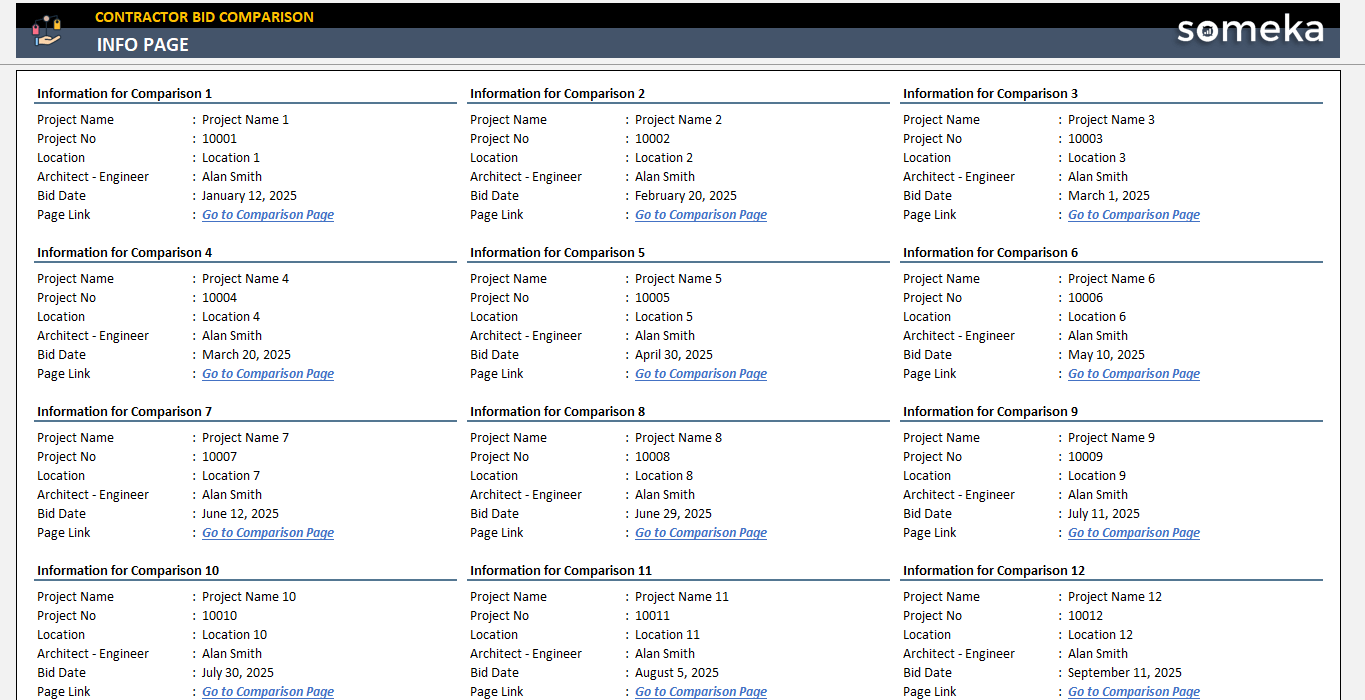
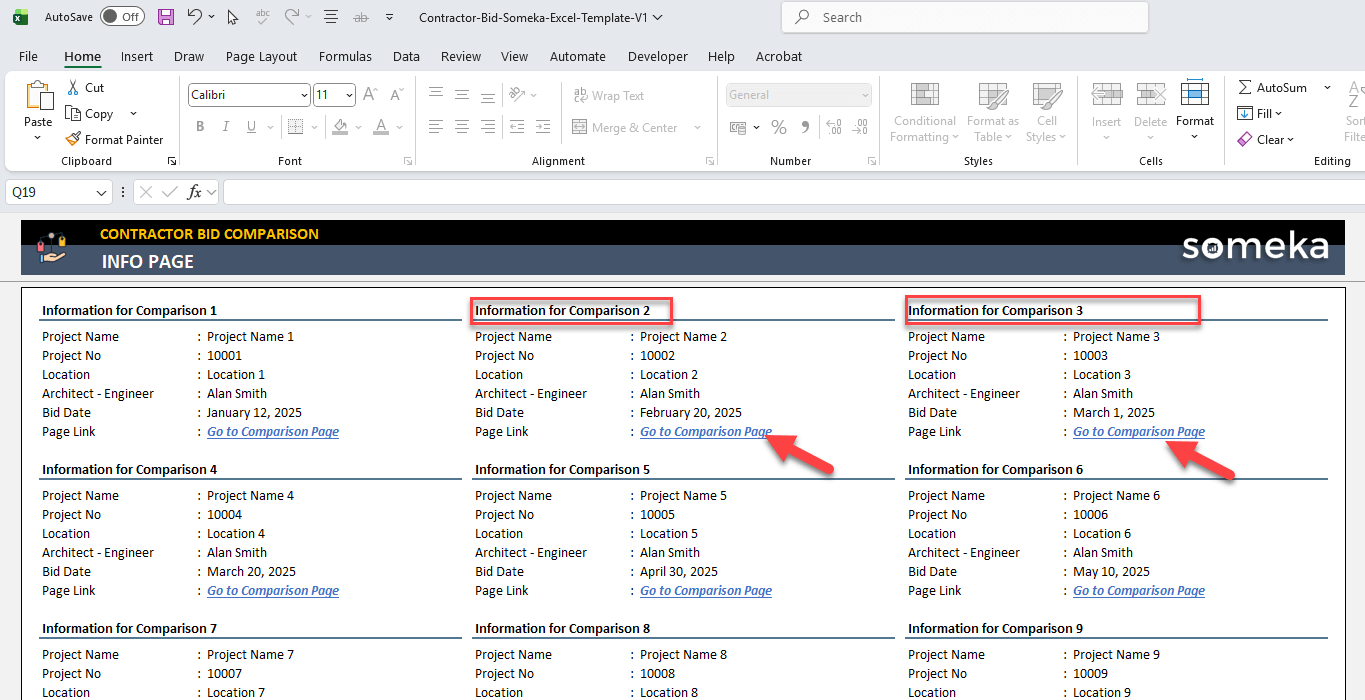
Chiefly, this Excel template includes a menu and 15 different comparison pages for different projects. The Menu sheet will include basic information on your projects, while the comparison pages will let you compare bids from your contractors.
1. Menu Sheet
Firstly, you’ll input basic information for your project:
- Project Name
- Project No
- Location
- Architect/Engineer
- Bid Date

Then, you can navigate to the relevant comparison page with the links in blue.
2. Comparison Pages
So, each project will have a separate comparison page.
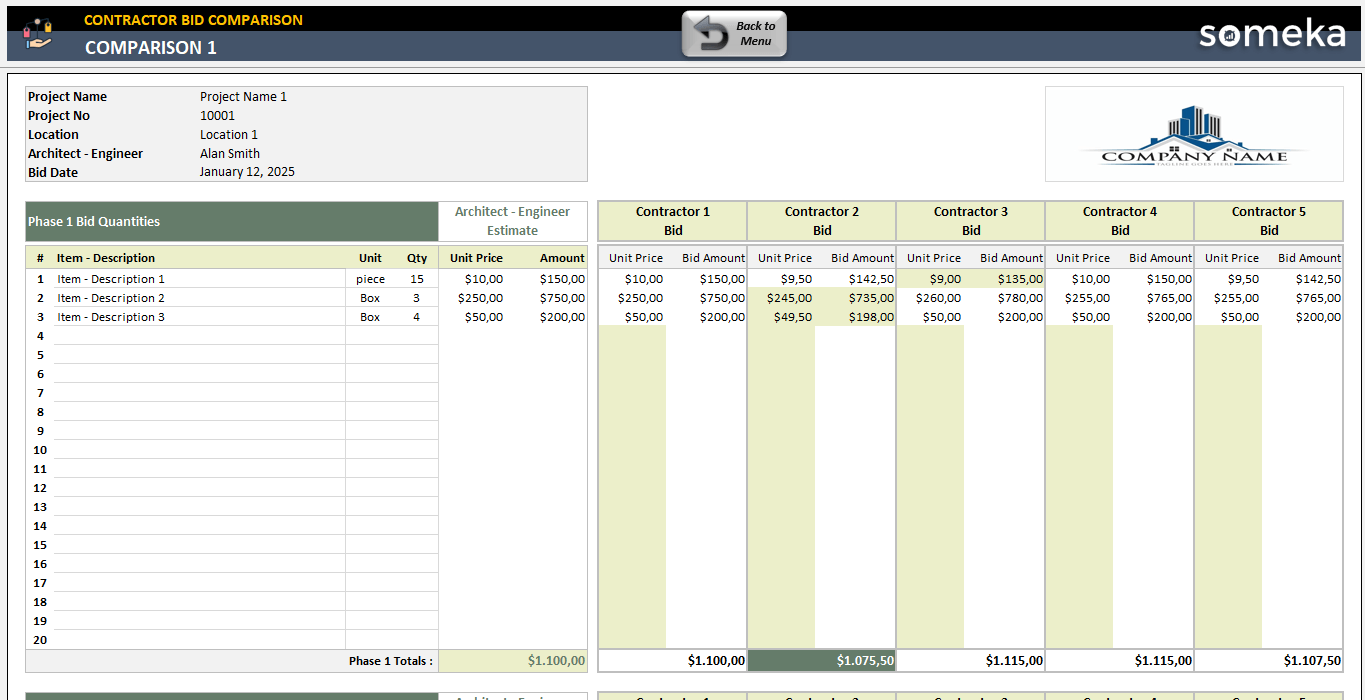
Firstly, you’ll see the main information about the project, which comes directly from the Menu sheet. Also, you have a logo section here.
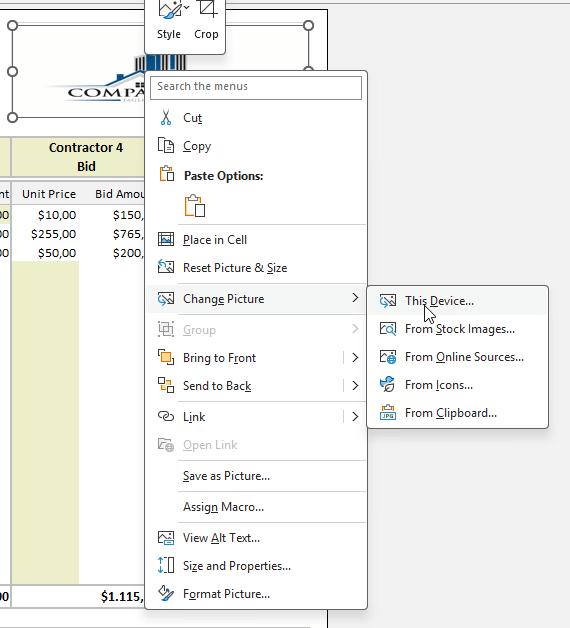
You may easily replace the dummy logo with your own:
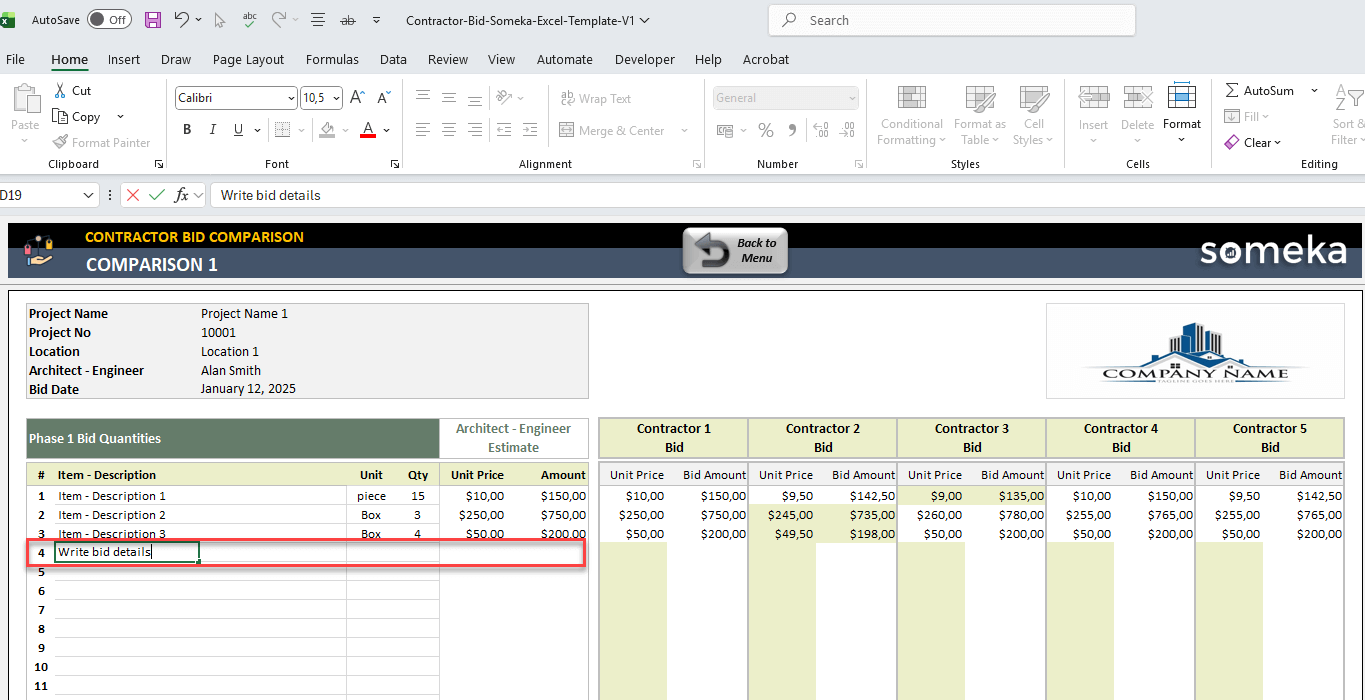
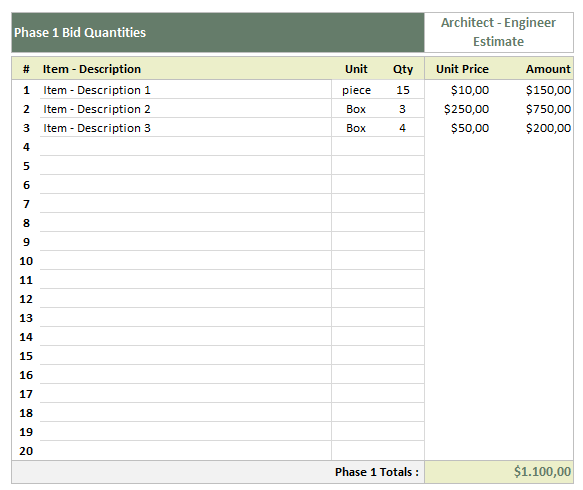
Then, you’ll have tables for 5 different phases. Please list down you construction cost items with unit and quantity. You can also add the estimate pricing from your architect or engineer.
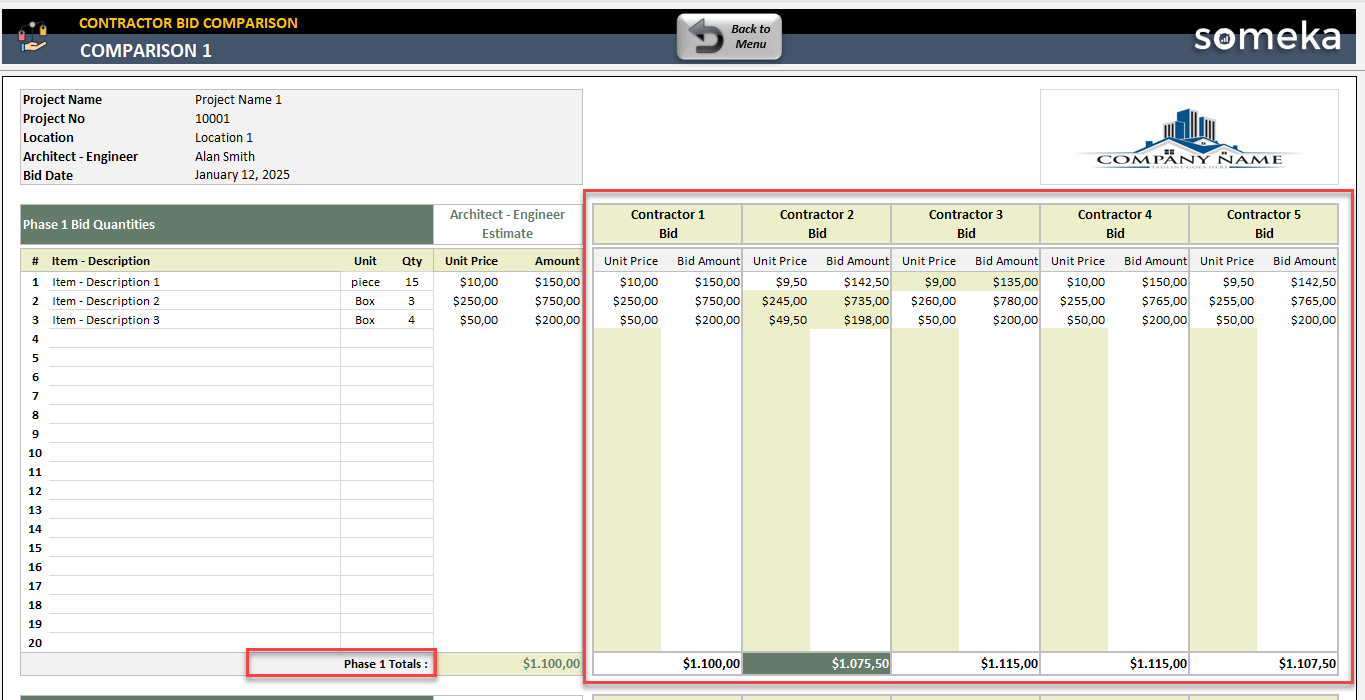
Now, it’s time to record contractor bids for each cost item to compare all different vendor prices.
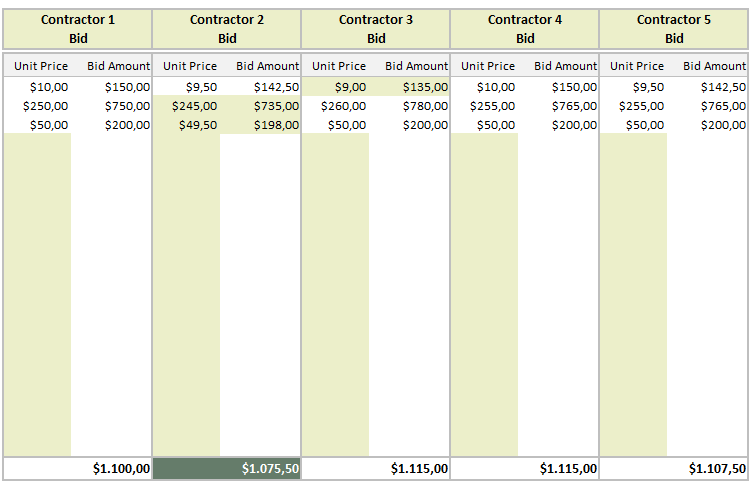
Indeed, the template will highlight the lowest pricing for each cost item here.
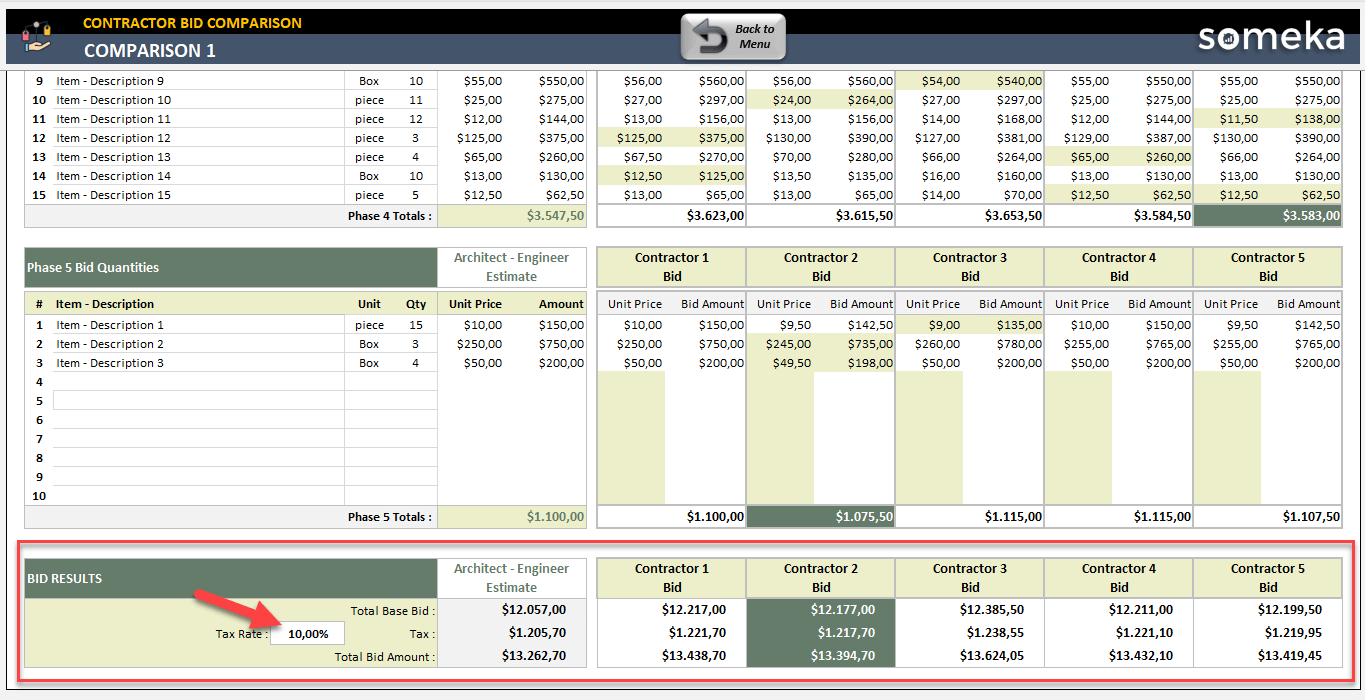
Lastly, at the bottom of each comparison sheet of this contractor bid excel template, you’ll find the bid results table.

So, this table not only summarizes you the Architect Estimate and Contractor Bids, but also highlights the lowest bid to help your contractor bid evaluation.
Additionally, you will have a tax calculation here. You’ll just input the tax rate, and the template will calculate the tax amount to add this to Total Bid Amount.
 That’s all! This Excel template will help your bid assessment for construction, renovation projects. It’s been defined for homeowners, project managers, real estate investors and other construction managing parties.
Contractor Bid Comparison Spreadsheet Features Summary:
- Excel Template to compare contractor bids
- All-in-one file for vendor comparison
- Compare up to 5 contractor proposals for 15 different projects across 5 phases
- Lowest bid highlights
- Also, automatic cost calculations
- Flexible and editable
- No installation, no setup
- Works both on Mac and Windows
- Compatible with Excel 2007 and later versions
- Does not include any VBA macros
FREQUENTLY ASKED QUESTIONS
Contractor Bid Excel Template Product FAQ
A contractor bid comparison spreadsheet is an Excel template that helps you evaluate and compare multiple contractor proposals side-by-side. It organizes bid information like pricing and contractor qualifications in one place, making it easier to identify the best value and make informed hiring decisions for your construction or renovation project.
To create a contractor bid comparison template in Excel:
- Start by setting up columns for contractor name, contact information, total bid amount, project timeline, payment terms, and line-item costs.
- Include rows for different work categories (labor, materials, permits)
- Add formulas to automatically calculate totals and percentage differences between bids.
- Use conditional formatting to highlight the lowest prices and create dropdown menus for standardized responses.
Yes, this template supports up to 15 projects across 5 phases in each.
You can compare up to 5 different contractor bids for each cost item for any project.
Also, you’ll be able to compare your bids with the estimated pricing from your architect or engineer.
Look beyond the bottom line by evaluating the scope of work detail, quality of materials specified, realistic timelines, contractor experience and references, insurance coverage, warranty offerings, and payment terms.
The lowest bid isn’t always the best value—it may indicate shortcuts, missing items, or unrealistic expectations. A good comparison helps you weigh these factors alongside cost.
USER REVIEWS & COMMENTS
You must be logged in to post a review.
RELATED TEMPLATES
-
 This product has multiple variants. The options may be chosen on the product page
Construction KPI Dashboard Google Sheets Template
$0.00 – $79.95Google Sheets KPI tool for construction firms. Track performance indicators to keep business safety. Printable dashboard with monthly chart analysis.
-
This product has multiple variants. The options may be chosen on the product page
Competitor Price Comparison and Analysis Excel Template
$0.00 – $59.95Competitor Price Comparison Template will help you to analyse and calculate the correct price positioning for your products and services in Excel.
-
This product has multiple variants. The options may be chosen on the product page
Airbnb Calculator Excel Template
$0.00 – $69.95Revenue calculator in Excel for Airbnb hosts. Easily track your income and expenses of daily bookings. Dynamic dashboard and calendar included.
-
This product has multiple variants. The options may be chosen on the product page
Real Estate Agency Excel Template
$0.00 – $69.95All-in-one tool for real estate agencies. Track all your brokers and properties in an Excel file. Printable invoice and dynamic dashboard included.
-
This product has multiple variants. The options may be chosen on the product page
Real Estate KPI Dashboard Excel Template
$0.00 – $79.95Excel KPI spreadsheet for real estate business. Track your key metrics with monthly and cumulative analysis. Printable and ready-to-present dashboard.
-
This product has multiple variants. The options may be chosen on the product page
Rental Property Income and Expenses Google Sheets Template
$0.00 – $69.95A Google Sheets template for landlords. No more stress on the tax time. Simple yet powerful property management tool with access from all devices.


Reviews
There are no reviews yet.